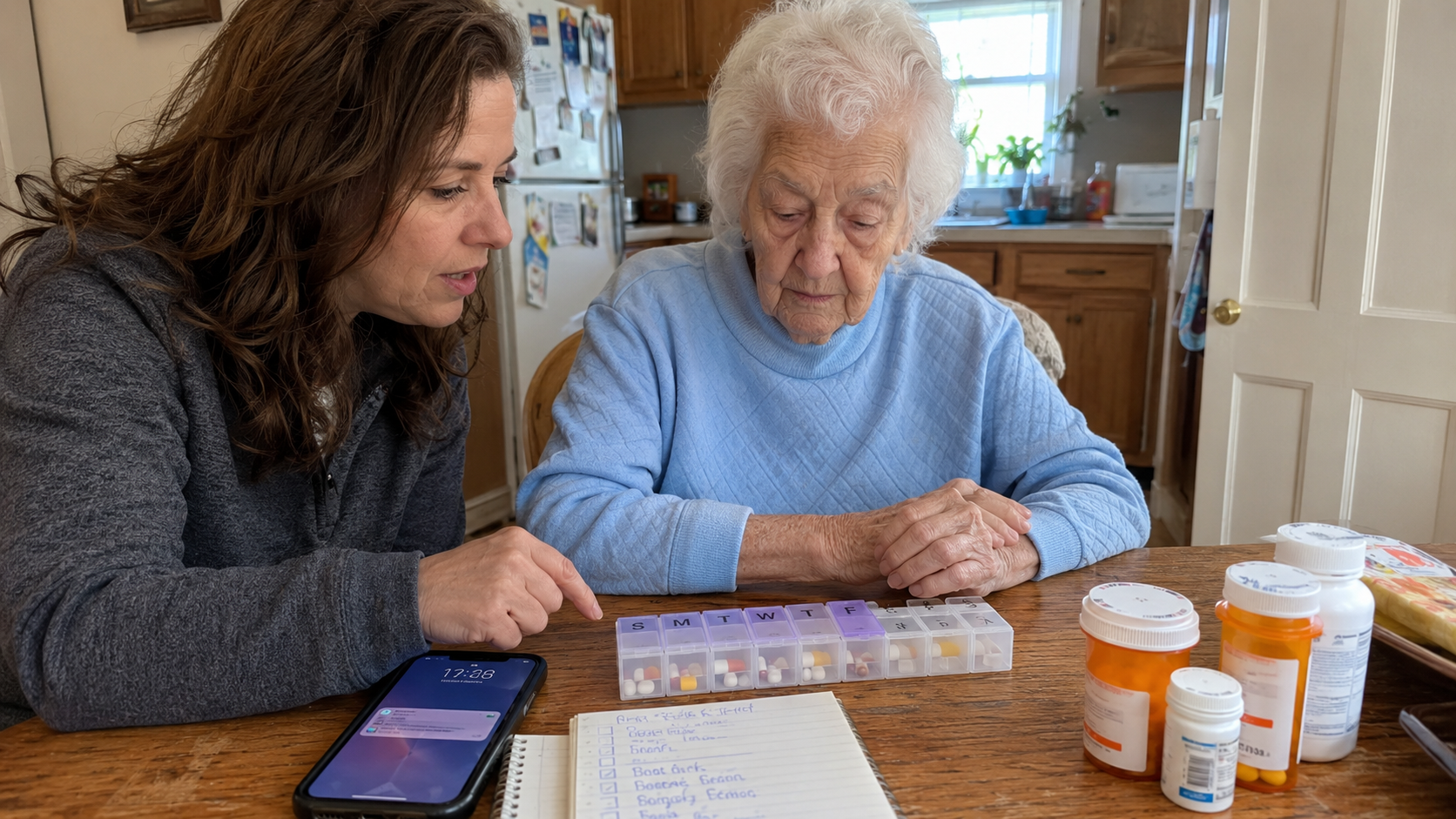
If you've ever stood in your parent's kitchen watching them stare at a pill organizer they've forgotten how to use, you already know that "just set up a reminder" isn't the answer the marketing materials promise it is. The hard part of elderly medication management isn't generating reminders. The hard part is making sure the right pill gets taken at the right time, knowing it actually happened, and adapting when whatever you set up two months ago stops working.
This article walks through what actually exists in the medication reminder category, what each type does well, where each one fails, and how to think about choosing one for your specific parent's situation. It's organized around the four main categories of reminder systems available today, but the more important framing is at the end: most reminder systems solve the prompting problem and leave the verification problem unaddressed. That gap is what separates a reminder system that actually helps from one that just adds another beeping device to your parent's countertop.
A note up front: this article is about workflow and coordination tools. It does not advise on specific medications, doses, or clinical decisions. Those conversations belong with your parent's doctor and pharmacist. The NIA's guide on taking medicines safely as you age is a good starting reference for the broader medication management framework, including the medication list every family should maintain.
Why simple reminders often don't work for elderly parents
Before getting to the system categories, it's worth understanding why the obvious solution often fails. A reminder system that works for a 45-year-old managing one daily medication is not the same problem as a reminder system that works for an 80-year-old managing eight medications across five different times of day with a diagnosis of mild cognitive impairment on the horizon.
A few realities make the elderly case different.
Older adults are more likely to take multiple medications. Polypharmacy (the simultaneous use of multiple medications) is common in adults 65 and older, and the more medications a person is managing, the more cognitive load each reminder carries. A reminder isn't just "take a pill"; it's "take this specific pill, not the one that looks similar, at this time, with or without food, and remember the doctor's instruction about not chewing it."
Cognitive change can be gradual and uneven. A reminder system that worked perfectly six months ago might be too complex for your parent today, and they may not be able to tell you that clearly. Many family caregivers discover the system has stopped working only when something goes wrong, which is exactly the failure mode any good reminder system should prevent.
Vision and dexterity often shift. A pill bottle that opens easily today may be difficult next year. An app interface that worked fine on the old phone may be unreadable on the new one. A reminder that's audible in a quiet kitchen may not be audible with a TV on or hearing aids out. Reminder systems that worked early in retirement frequently fall apart silently as physical capacity changes.
Living arrangements matter. An elderly parent who lives alone has no built-in backup. A parent who lives with a spouse may have a partner who can serve as backup, but the spouse may also be aging and managing their own medications. A parent in assisted living has staff support but variable visibility into what actually happened. The right reminder system depends heavily on what backup already exists.
Knowing these realities, the four categories of reminder systems each handle a different part of the problem. None of them solves all of it.
Category 1: Simple manual systems
This is where many families start: a weekly pill organizer (one compartment per day, or sometimes four compartments per day for morning/noon/evening/bedtime), and possibly a paper log or calendar to track whether each dose was taken.
What it does well. It's cheap, it requires no technology, it's familiar, and the act of physically placing the pills into compartments at the start of the week is itself a verification step (you can see whether last week's compartments are empty or full). For a sharp parent managing two or three medications on a stable schedule, this is often the right system.
Where it fails. It depends on someone reliably placing the pills correctly each week and reliably checking the compartments at the right time. If the parent does this themselves and they're starting to forget, the system fails silently: the pills don't get taken, the compartments stay full, and no one notices until the next refill. If a family member does the loading, they need to either visit weekly or trust the parent to follow the system. There's no active prompting, just a passive container.
When this is enough. A capable parent with a simple medication regimen, living with a spouse or adult child who can notice when something's off, and where the cognitive trajectory is stable.
When this isn't enough. Any sign of inconsistent self-management, any complex schedule (more than once or twice a day), any medication where missed doses have immediate consequences, or any situation where you can't physically check the organizer regularly.
Category 2: Phone-based reminders
The next step up: alarms on the parent's phone, calendar notifications, or a medication reminder app installed on the parent's device. The NIA notes that medication reminder apps for smartphones are becoming more popular as a way to help older adults remember when and how to take medications.
What it does well. It actively prompts the parent at the right time. It's portable. It can handle complex schedules. It's free or very cheap.
Where it fails. It depends on the parent's relationship with their phone. If the parent silences notifications, misplaces the phone, or stops trusting the app for any reason, the reminders quietly stop functioning. There's no visibility for family members; you don't know whether the alarms are firing, being heard, being acted on, or being dismissed. Phone reminders also require the parent to acknowledge the reminder and take action immediately, which is a step many forgetful users skip without realizing.
The other failure mode worth naming: many seniors set up phone reminders during a moment of motivation, but the system slowly degrades over months. The phone gets replaced, the app gets deleted by accident, the volume gets turned down, and no one notices because the system was invisible to everyone except the parent.
When this is enough. A parent who has a strong phone habit, manages their own technology confidently, and has at least mild cognitive function. Often works well as a first step before more support becomes necessary.
When this isn't enough. Any cognitive decline, any pattern of missed doses, or any situation where a family member needs to know whether the dose was actually taken.
Category 3: Automated pill dispensers
The largest category by retail visibility. Devices in this space include Hero, MedaCube, the Bloom Flower dispenser, and the e-pill Station Pro, among others. These are countertop machines that store pre-loaded medications in internal compartments and dispense the correct pills at scheduled times, usually with audible and visual prompts. AARP has reviewed several of these devices, noting their utility for aging-in-place support.
What it does well. The dispenser solves the "wrong pill" problem because it physically controls which pills come out. It actively prompts at the scheduled time. Many include companion apps that notify a family caregiver if a dose is missed. They can handle complex schedules with multiple daily doses. They're locked, which prevents accidental double-dosing or grandchild access. Some models can store 90 days or more of medications, reducing how often family members need to refill them.
Where it fails. They're expensive. Most have monthly subscription fees on top of the device cost, and they're typically not covered by Medicare except in narrow circumstances. They require an upfront loading process that's either done by the family or by the device's mail-order pharmacy partner. They handle pills only; injectables, liquids, inhalers, and patches still need a separate system. They take up significant counter space. And when they fail (jam, lose Wi-Fi, run out of pills, lose power), the parent often doesn't know how to troubleshoot, and the entire medication routine stops.
A more subtle failure mode: dispensers are excellent at prompting but they still don't verify that the parent took the pills that came out. Some have sensors that detect whether the dispense cup was emptied, but a determined or confused user can take the cup, set it on the counter, and forget about it. The pills are dispensed; the dose isn't taken.
When this is enough. A parent with significant medication complexity, mild-to-moderate cognitive issues, family that can afford the cost, and a willingness to commit to the device's specific workflow. The device-centric approach also works well when a single caregiver is doing all the coordination and just needs a reliable countertop system.
When this isn't enough. Active dementia where the parent doesn't understand the dispenser's prompts. Households where multiple caregivers need real-time visibility into what happened. Situations where the dose verification (not just the dispense event) matters, such as time-sensitive medications.
Category 4: Shared and coordinated systems
The newest category, and the one that's most directly relevant when more than one person is responsible for an elderly parent's medications. These are app-based systems that let multiple family members and caregivers share a real-time view of the parent's medication schedule, log when doses are given, and see what's been done and what's still due.
What it does well. It solves the verification problem that the other categories leave open. When one person logs that a dose was given, everyone with access immediately knows. The "did you give Mom her noon pills?" text becomes unnecessary because the answer is in the app. It works whether the parent lives alone, with one of their adult children, or in a facility where staff and family both need visibility. It handles all medication types (pills, liquids, injectables, patches, eye drops) because it's about logging, not dispensing.
Where it fails. It depends on humans actually logging the doses in real time, which is a behavior change that takes a few weeks to establish. It doesn't prompt the parent directly (though some versions do offer reminders); the prompting is usually for the caregiver. It requires that at least one family member be comfortable enough with a smartphone app to drive the setup.
There's also a category limitation worth naming: a shared logging system works best when the parent has some caregiver involvement, even if light. For a fully independent parent who lives alone and has no daily caregiver contact, this category doesn't fit as well as a phone-based or dispenser system.
When this is enough. Any caregiving situation involving more than one person. Households with multiple siblings sharing duty. Families where one parent is the primary caregiver and others are checking in. Senior living situations where family wants visibility into what staff is doing. Multi-generational households where adult children, spouses, and home aides are all giving doses.
When this isn't enough. A parent who is fully independent and resists any caregiver involvement, where the issue is purely "I forget" rather than "we need to coordinate." In that situation, a phone-based reminder or a simple manual system may be a better starting point.
Choosing based on the situation
The right category depends less on which features sound best and more on which problem you're actually solving. A few common situations:
A parent who is sharp but managing more medications than they used to. Start with a weekly pill organizer and a phone-based reminder. The simple combination is often enough. Re-evaluate when something starts going wrong.
A parent with mild forgetfulness and multiple medications. An automated dispenser can carry a lot of the cognitive load. The dispenser prompts, dispenses the right pills, and a caregiver companion app provides backup awareness if doses are missed. The cost is meaningful, but for the right situation, it's a reasonable investment.
A parent with moderate cognitive decline and active family involvement. A shared logging system is usually the better fit here, because the issue has shifted from "remind the parent" to "coordinate the caregivers." The dispenser may still be useful, but the bigger gap is coordination among the people giving care.
A parent with active dementia. Most reminder systems become less effective at this stage because the parent's ability to act on prompts has degraded. The most reliable approach is direct human delivery by a caregiver, supported by a shared logging system so everyone involved knows what's been given. The dementia-specific medication tracking article covers this stage in more depth.
Multiple siblings sharing care for a parent. Coordination becomes the dominant problem. A shared system that gives everyone the same real-time view is the right starting point. The multi-caregiver coordination article covers the specific dynamics of sibling-led care circles.
The verification gap nobody talks about
Here's the thing most reminder system marketing doesn't highlight: prompting and verification are different problems. A reminder system can prompt your parent perfectly and have no idea whether the dose was actually taken. A dispenser can release the right pills and not know whether they were swallowed or left on the counter. Even a sophisticated app can send a notification that gets dismissed without action.
For most situations, the prompting problem is the smaller one. The bigger problem is what happens after the prompt. Did the dose actually get taken? When? By whom? If a family member calls in the evening and asks whether Mom took her noon pills, do they have an actual answer or just a hope?
The answer depends entirely on whether the system you've chosen creates a real-time record that everyone involved can see. Some dispensers do this within their own ecosystem. Some apps do this. Most reminder approaches do not. When you're evaluating a reminder system, the question worth asking is not "will it prompt my parent?" The question is "will I know whether the dose was actually taken, and how soon?"
Reminders without verification create false security. The phone alarm went off; we assume the dose was taken; weeks later we discover it wasn't. Verification without reminders is incomplete in the other direction. The verifying caregiver has visibility but no prompting structure, so they're doing all the cognitive work themselves.
The combination that actually works in most caregiving situations is a system that handles both: prompts the parent or caregiver at the right time, and creates a shared real-time record of what was done so that anyone involved can verify status without having to ask.
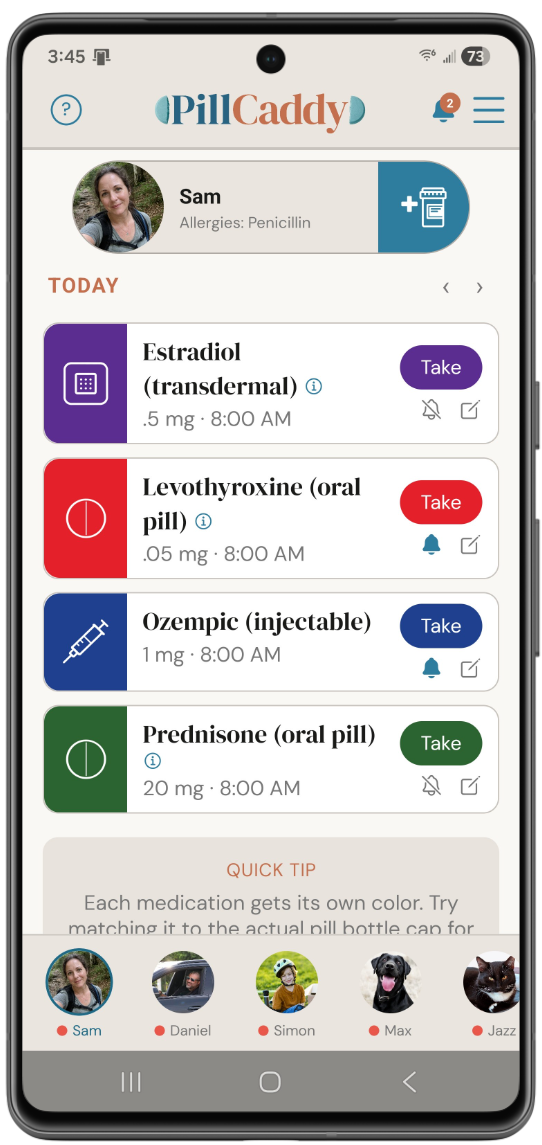
This is what PillCaddy is built to do. You add your parent to the app, set up their full medication schedule (with frequencies, dosages, and any special instructions), and share access with everyone in the care circle. When any caregiver logs a dose, everyone else sees it in real time. The medication name, the dose, the time it was given, and which caregiver gave it are all recorded. When a dose is approaching or overdue, anyone with access can see at a glance what's coming up. No one has to text "did you give the noon pills?" because the answer is already visible.
The Essentials tier covers the core multi-caregiver coordination workflow at no cost. The Plus tier expands access to larger care circles for families with multiple siblings, aides, or other adults involved in the day-to-day. For most family caregiving situations, the verification gap is the part of medication management that pure reminder systems leave unaddressed, and a shared real-time log is what fills it.
When reminders aren't the issue
A final honest note. Sometimes the question isn't which reminder system to use; it's whether reminders are the right intervention at all.
If your parent is genuinely not safe managing their own medications, no reminder system substitutes for direct caregiver involvement. The system supports the caregivers; it doesn't replace them. The decision to move from "supported self-management" to "caregiver-administered medications" is a real one, and it usually comes with associated changes (more frequent visits, in-home care, a higher level of facility-based support).
If your parent's medication list itself is the problem (too many medications, conflicting instructions, side effects from interactions), the right conversation is with the prescribing doctor and pharmacist about whether the regimen can be simplified. Polypharmacy is a known concern for older adults and worth a periodic review. The reminder system can only help with following the instructions you've been given; it can't fix instructions that need to be reconsidered.
And if your parent is refusing to take their medications for reasons you don't fully understand (fear of side effects, dislike of how they feel, depression, denial of a diagnosis), the reminder isn't the missing piece. The conversation underneath the refusal is, and that conversation often benefits from professional help.
Most family caregiving situations can be improved by the right reminder and verification system. Some can't, and recognizing the difference matters.
A closing word
The medication reminder category looks like it should be straightforward: pick a system, set it up, problem solved. The reality is that the right system depends on your parent's specific situation today, that the situation will change over time, and that the most important feature of any system is whether it answers the verification question, not just the prompting question.
The systems that work long-term tend to share a few qualities: they accommodate complexity without becoming complicated to use, they create visibility across everyone involved in care, and they degrade gracefully when one part of the system fails. The systems that fail tend to be the ones that look impressive in a demo but quietly stop working when something changes in your parent's life.
If you're early in this process, the senior medication management guide covers the broader management workflow that any reminder system needs to fit inside. If you're choosing among specific apps, the comparison of medication reminder apps covers what to look for. And if you're already in the situation where multiple family members are sharing duty, the multi-caregiver coordination article covers the dynamics of making that work without burning out.
The goal is not the perfect reminder system. The goal is one that actually keeps your parent safe and gives you enough visibility to trust the answer when someone asks how they're doing.

The reminder gap most systems leave open
PillCaddy is the shared real-time medication log that fills the verification gap pure reminder systems leave behind. Any caregiver in the care circle can log a dose, and everyone else sees it immediately, so the question of whether the dose actually happened has an answer instead of a guess. Essentials is free; Plus covers larger care circles with multiple siblings, aides, and caregivers.
Frequently asked questions
What is the difference between a medication reminder and verification?
A reminder prompts someone to take a dose, while verification confirms whether the dose was actually taken. Most reminder systems handle prompting well but leave verification unaddressed, so a phone alarm can fire and no one knows whether anything happened. The systems that work long term answer both questions.
Are automated pill dispensers worth the cost?
Dispensers can carry a lot of cognitive load by controlling which pills come out and prompting at the scheduled time, and many notify a caregiver if a dose is missed. They are also expensive, often carry a subscription, handle pills only, and can stop the whole routine if they jam or lose power. Whether one fits depends on your parent's complexity, your budget, and a willingness to commit to the device's workflow.
My parent lives alone and just forgets doses. What kind of system fits?
When the issue is purely forgetting rather than coordination, a phone-based reminder or a simple weekly pill organizer is often the right starting point. Shared logging systems shine when caregivers are involved, so they fit less well for a fully independent person with no daily caregiver contact. Re-evaluate if the situation changes.
Which reminder system is best for a parent with dementia?
As dementia advances, most reminder systems become less effective because the parent's ability to act on a prompt declines. The more reliable approach is direct delivery by a caregiver, supported by a shared record so everyone knows what was given. The right specifics depend on the stage and on the family's situation.
We have several siblings sharing care. What should we start with?
When multiple people share duty, coordination becomes the dominant problem, so a shared system that gives everyone the same real-time view is the natural starting point. It removes the back-and-forth texting because the status is visible to anyone who looks. PillCaddy is built for exactly this kind of multi-caregiver coordination.
Why do reminder systems that worked at first stop working later?
Cognitive change, vision, and dexterity can all shift gradually, and a system that fit six months ago may be too complex today without anyone noticing. Phone reminders quietly degrade when a phone is replaced or the volume is lowered, and pill organizers fail silently when compartments stop getting checked. Building in periodic review catches these failures before something goes wrong.
Is a medication app enough on its own to keep my parent safe?
An app supports the people doing the caregiving, but it does not replace them. If a parent is genuinely not safe managing their own medications, the system helps caregivers coordinate rather than substituting for hands-on involvement. Decisions about the medications themselves always belong with the doctor and pharmacist.